


RYOEX Deposit Guide | Easily Transfer Funds via Bank Transfer or Cryptocurrency

 2026-03-18
Before you start trading on RYOEX, it is important to understand how the RYOEX Wallet works and to follow the correct deposit procedures.
This guide provides a clear, step-by-step explanation of the following topics:
-
RYOEX Wallet Basics: How the wallet works and its key functions
-
Deposit Methods: Step-by-step instructions for bank transfers and cryptocurrency deposits
-
Fund Transfers: How to move funds from your wallet to your trading account
-
FAQs: Answers to common questions about deposits and fund transfers
This guide will help first-time users make deposits and transfer funds smoothly, so you can start trading right away.

What Is the RYOEX Wallet?
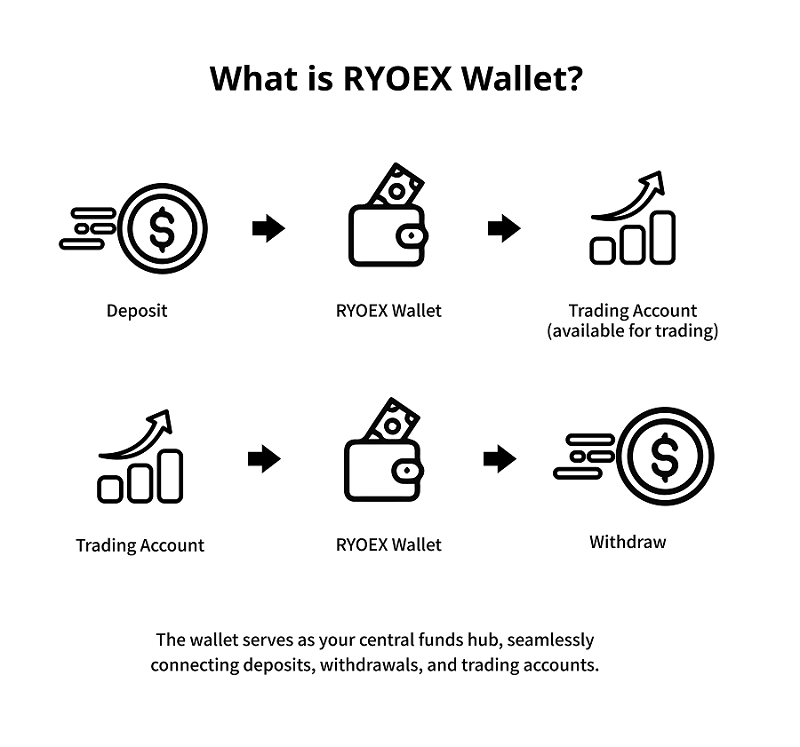
The RYOEX Wallet is a central hub that lets you manage your funds in one place, ensuring smooth and secure deposits, withdrawals, and trading.
When you make a deposit, the funds are first added to your RYOEX Wallet. You can then transfer the desired amount from the wallet to your trading account to start trading. Withdrawals follow the same flow—first transfer funds from your trading account back to the wallet, then withdraw using your preferred method.
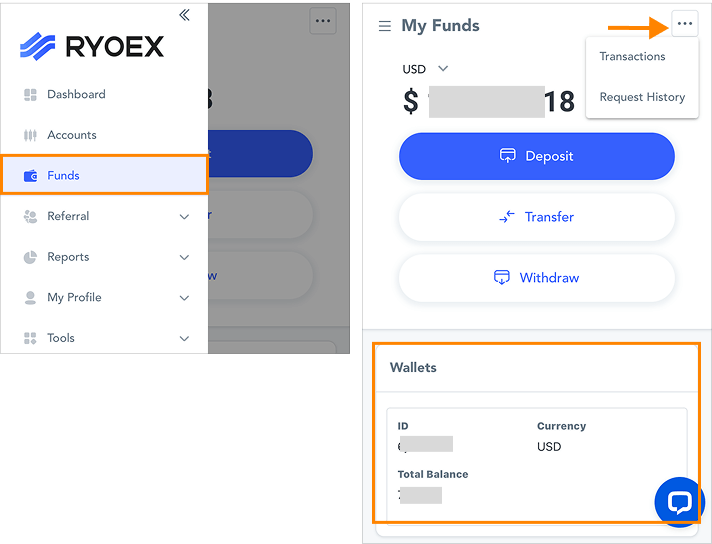
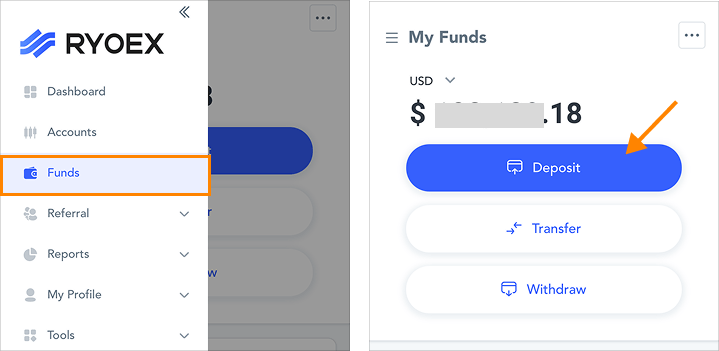
Log in to My RYOEX and open “Funds Management” from the dashboard menu to instantly check your wallet balance as well as your deposit and withdrawal status.
Deposit Methods | Bank Transfer & Cryptocurrency
RYOEX offers two deposit methods to suit your needs: bank transfer and cryptocurrency deposits.
Below, we provide clear, step-by-step instructions for both deposit methods.
How to Deposit via Bank Transfer
Deposits via bank transfer can be completed easily in just two steps.
-
1.
Deposit funds to the designated RYOEX bank account
-
2.
Enter your deposit details on the My RYOEX deposit page
1. Deposit Funds to the RYOEX Designated Bank Account
Step 1. Open the Deposit Page
Log in to My RYOEX, then click “Deposit” on the dashboard or navigate to “Funds Management” → “Deposit” from the menu to access the deposit page.
Step 2. Make a Bank Transfer
-
1.
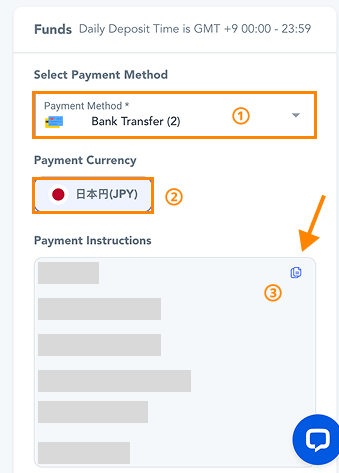
Select “Bank Transfer” as your payment method.
-
2.
Choose “JPY” as the payment currency.
-
3.
Review the transfer details displayed on the screen, then complete the bank transfer. Please note that transfer details may be updated, so always use the most recent information shown at the time of transfer.
Additionally, for each RYOEX trading account type, a minimum deposit requirement applies only to your first deposit.Please transfer an amount equal to or greater than the minimum required for your selected account type.
-
Basic Account: 5 USD
-
Standard Account: 500 USD
-
Edge Account: 1,000 USD
-
Raw Spread Account: 5,000 USD
-
Onyx Account: 100,000 USD
※ After completing the transfer, be sure to save a copy of your transfer receipt (such as a screenshot or photo).
2. Enter Your Deposit Details in My RYOEX
Step 3: Enter Your Deposit Information
After completing your bank transfer, return to the My RYOEX deposit screen and follow the steps below:
-
1.
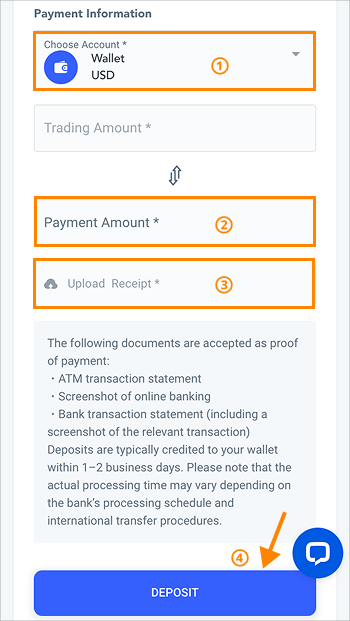
Select “Wallet USD” under “Deposit To.”
-
2.
Enter the actual transferred amount in JPY under “Payment Amount.” The system will automatically convert it to USD based on the current exchange rate.
Upload a document that verifies your transfer (ATM receipt, online banking screenshot, or bank statement).
Click “Proceed with Deposit” to continue to the deposit history screen.
Step 4: Confirm Your Deposit
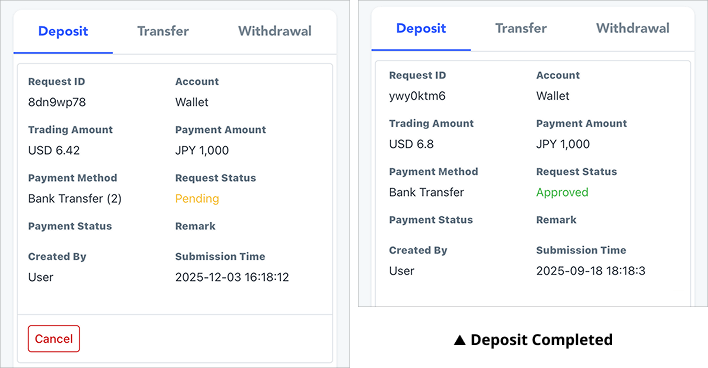
our deposit is complete once the status changes from “Pending” to “Approved.” After approval, you can verify the deposited amount in your RYOEX Wallet.
How to Deposit with Cryptocurrencies
RYOEX supports deposits in USDT, BTC, and ETH.
The deposit procedure is the same for all supported cryptocurrencies, and here we will explain it using USDT as an example.
Deposits can be completed easily in just two main steps.
-
Send USDT to the designated wallet
-
Enter deposit details on the My RYOEX deposit screen
1. Send USDT to the designated wallet
Step 1: Open the deposit page
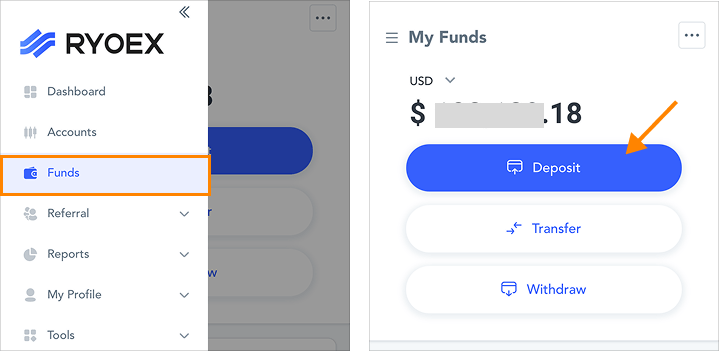
After logging in to My RYOEX, click “Deposit” directly from the dashboard, or navigate through “Funds Management” → “Deposit” to open the deposit page.
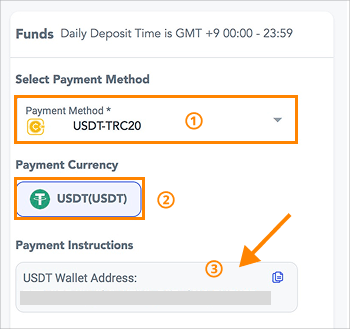
Step 2: Deposit with USDT
-
1.
Select “USDT-TRC20” as the payment method.
-
2.
Select “USDT” as the deposit currency.
-
3.
Confirm the displayed USDT wallet address, then transfer USDT from your personal wallet or exchange to the specified deposit address. Please note that the USDT wallet address may change. Always use the latest address shown at the time of transfer.
In addition, for your first deposit, you must transfer an amount equal to or greater than the minimum deposit requirement set for each trading account. Please send at least the following amount:
-
Basic Account: 5 USD
-
Standard Account: 500 USD
-
Edge Account: 1,000 USD
-
Low Spread Account: 5,000 USD
-
Onyx Account: 100,000 USD
※ After completing the transfer, make sure to save the transaction record (such as a screenshot or photo).
Please ensure that the saved transaction proof includes the following information:
-
Transaction amount
-
Transaction date and time
-
Transaction hash (TxID)
-
Recipient wallet address
2. Enter Deposit Information on the My RYOEX Deposit Page
Step 3. Enter Deposit Details
After completing the transfer, return to the deposit page on My RYOEX and enter the required deposit information as follows.
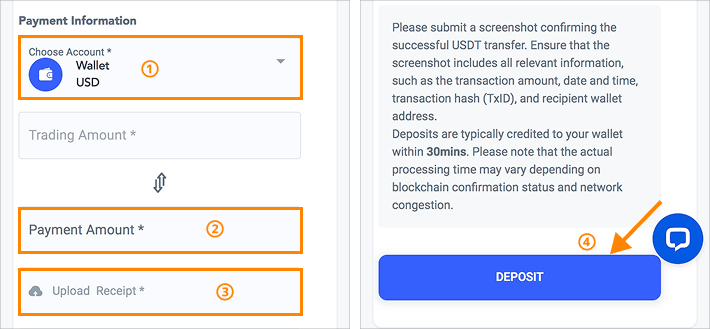
① Select “Wallet USD” under “Select Deposit To.”
② Enter the actual amount sent in “Payment Amount” (USDT). The system will automatically convert it to the transaction amount (USD) as needed.
③ Upload a screenshot or transaction history that proves the transfer.
Click “Proceed with Deposit” to move to the deposit history page.
Step 4. Confirm the Deposit Completion
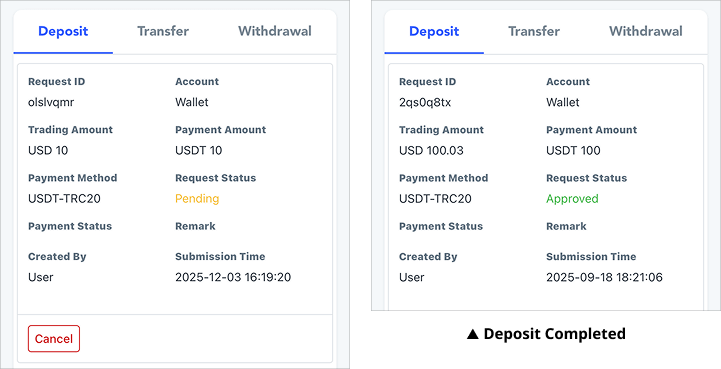
Your deposit is complete once the status changes from “Pending” to “Approved.” After approval, you can check the deposited amount in your RYOEX Wallet.
How to Transfer Funds|Moving Funds from Wallet to Trading Accounts
After depositing funds into your RYOEX Wallet via bank transfer or cryptocurrency, you will need to < span class="under-yellow-3">transfer funds from your wallet to your trading accountbefore you can start trading.
Fund transfers are completely free of charge, so you can use the service with confidence.
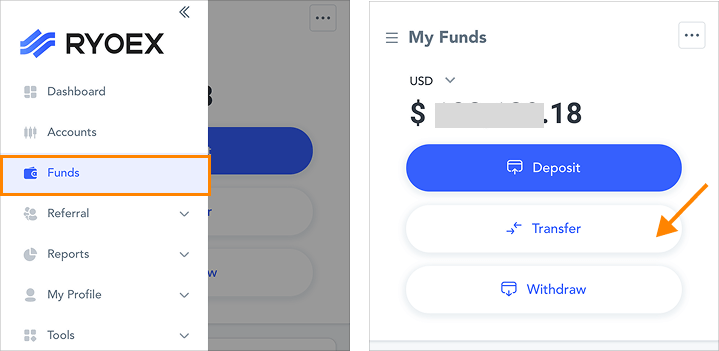
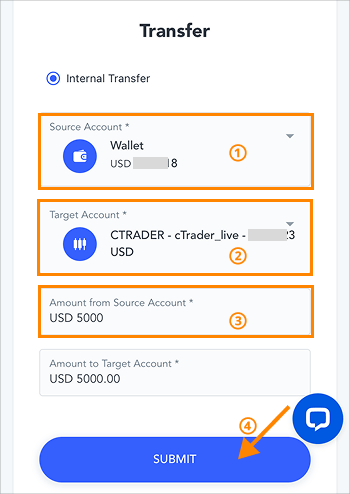
Step 1. Open the Fund Transfer Screen
From the My RYOEX menu, click “Funds Management” → “Fund Transfer”.
Step 2. Transfer Funds
-
1.
Select “Wallet” as the source account.
-
2.
Select the trading account you want to transfer funds to as the destination account.
-
3.
Enter the transfer amount for the source account, and the amount for the destination account will be automatically reflected.
-
4.
Click “Confirm” to view the fund transfer history.
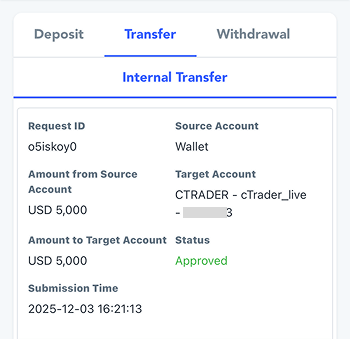
Once the status shows “Approved,” the fund transfer is complete. You can now start trading in your selected trading account.
【▼Fund Transfer Successful】
Frequently Asked Questions About Deposits and Funds Transfers
Yes, the RYOEX Wallet currently supports USD only.
If you deposit in JPY, the amount will be automatically converted to USD based on the exchange rate at the time of deposit. The same applies when withdrawing in JPY — the system will automatically convert your USD balance, so no additional procedures are required.
RYOEX does not charge any fees for deposits. However, your bank or the payment service you use may apply their own transaction fees.
Deposits can be made 24 hours a day.
However, deposit review and processing by RYOEX are carried out between 08:00 and 22:00 (JST).
Deposit requests submitted outside these hours will be processed on the next business day or later.
・Bank Transfer: Funds are typically reflected in your wallet within 1–2 business days.
However, processing times may vary depending on your bank’s handling procedures or international transfer processes.
・For cryptocurrency deposits:The funds are usually reflected in your wallet within 1 business day.
However, the processing time may vary depending on the congestion of the blockchain or the transfer network.
No, there is no upper limit on deposit amounts. You may deposit freely according to your needs
Yes, for a limited time, you can receive a bonus equal to 3% of your deposit when funding your account with cryptocurrency.
No. All fund transfers are completely free of charge.
・RYOEX Wallet ⇔ Trading Account
・Trading Account ⇔ Trading Account
Transfers in any direction incur no fees whatsoever. In addition, even when transferring between different currencies, the system will automatically convert the amount at the prevailing exchange rate, with no extra charges applied.
Each trading account on RYOEX has a minimum initial deposit requirement.
Therefore, when transferring funds for the first time, you must enter an amount that meets the minimum requirement:
-
Basic Account: 5 USD
-
Standard Account: 500 USD
-
Edge Account: 1,000 USD
-
Low-Spread Account: 5,000 USD
-
Onyx Account: 100,000 USD
Once this initial requirement is met, there are no amount restrictions for subsequent transfers, and you may move funds freely.
Enjoyed this article? Share it with your network!


RYOEX Official Media is an information platform created specifically for traders, offering the latest news, analysis, guides, and more. From beginners to experienced traders, we provide useful content to help you stay informed and succeed in your trading endeavors.


